Block spam & robocalls
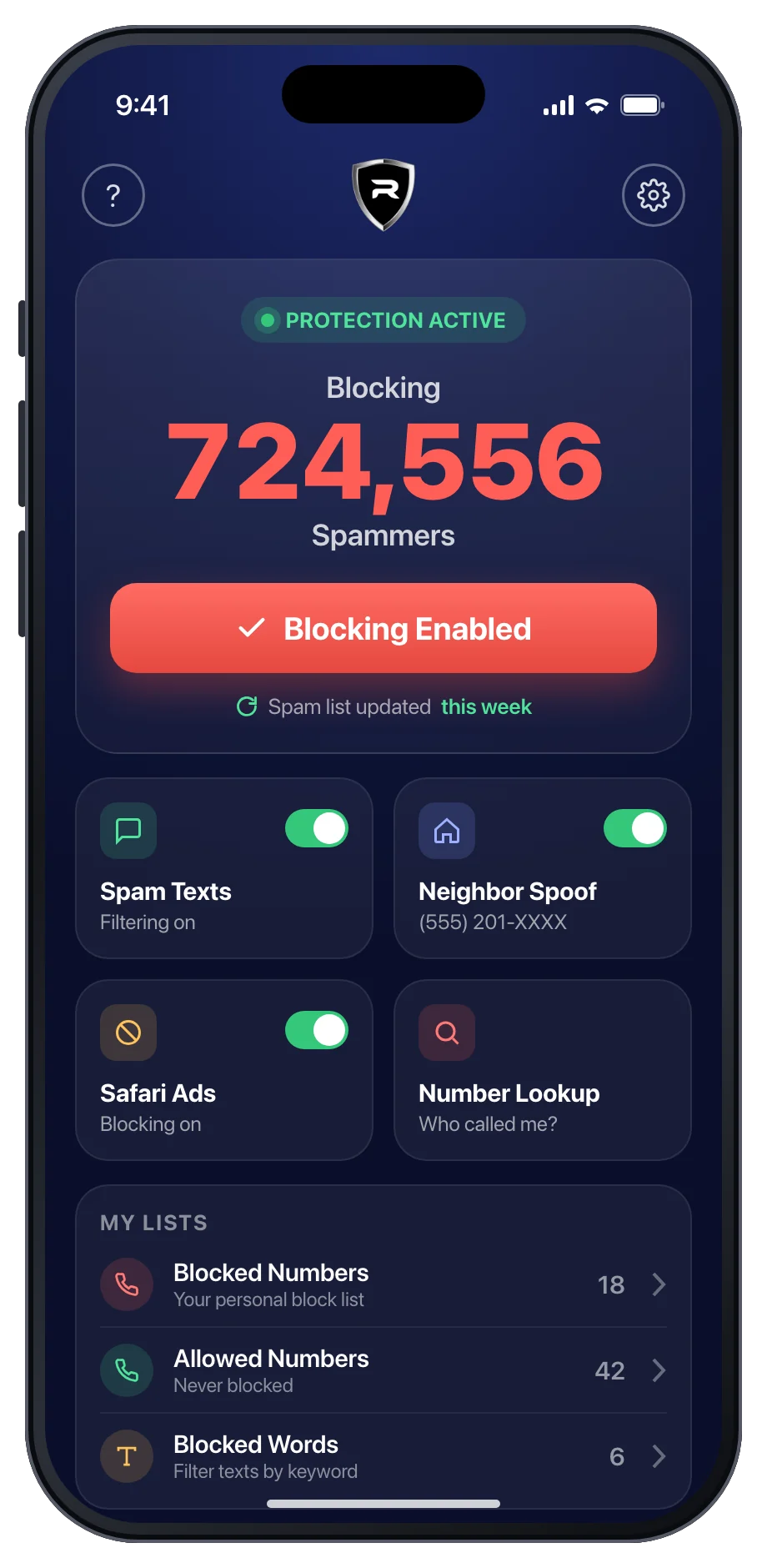
More than 700,000 known spam, telemarketing and robocall numbers are blocked automatically, without a single ring.
Robot Call Blocker stops robocalls, telemarketers, spam texts and neighbor-spoofing scams before they ever reach you, using a growing list of more than 700,000 known spam numbers.
Scammers use cheap auto-dialers and faked caller IDs to reach millions of phones a day. Most of the calls are scams or telemarketing.
robocalls reached Americans in 2025. That's about 1,660 every second.
Source: YouMail Robocall Index, 2025lost to fraud in 2025, a record. Imposters reach victims by phone call and text message.
Source: Federal Trade Commission, 2026of robocall volume is scams or telemarketing, the calls you never asked for.
Source: YouMail Robocall Index, Nov 2025One app protects your calls, your texts and your Safari browsing. It runs quietly in the background.
More than 700,000 known spam, telemarketing and robocall numbers are blocked automatically, without a single ring.
Fake delivery notices, phishing links and political spam go to a separate junk folder. Block any word or phrase you choose.
Scammers fake local numbers so you'll pick up. Block every call that matches the first six digits, while your contacts still get through.
A built-in Safari content blocker removes ads and spammy pop-ups, so pages load faster and cleaner.
Missed a call from a number you don't recognize? Look it up to find out who it might be before you call back.
A bad number got through? Block it. A good number got blocked? Allow it. You stay in control, and the spam list updates every week.
Robot Call Blocker uses Apple's own call-blocking and message-filtering features, so it's fast, reliable and battery-friendly.
Get Robot Call Blocker free from the App Store and start your free trial.
In Settings, go to Apps › Phone › Call Blocking & Identification and switch Robot Call Blocker on. The app shows you how.
Spam calls are blocked silently and spam texts are filtered. Open the app now and then to load the latest spam list.
Apple designed call blocking and SMS filtering so apps like ours never see your call history or read your conversations. We give iOS the list of numbers to block, and iOS does the rest.
Rated 4.3 out of 5 from about 5,000 ratings on the App Store.
I was getting 10 or more spam and telemarketing calls a day. Since I installed this, only two got through last month.
I have been bombarded by political donation requests, 10-12 a day… So this year I bit the bullet and subscribed. WORTH EVERY PENNY!!! Not one text gets through.
It has stopped those calls I get all day, sometimes 15 calls or more a day… now what peace.
Robot Call Blocker loads a list of more than 700,000 known spam, telemarketing and robocall numbers into iOS's built-in Call Blocking & Identification feature. When one of those numbers calls, your iPhone blocks it silently. The list is updated weekly. Just open the app after an update to load the latest numbers.
No. Apple's call blocking and SMS filtering work on your iPhone. The app gives iOS a list of numbers to block and rules for filtering texts. It never sees your call history, and text filtering happens on the device.
Neighbor spoofing is when scammers fake a caller ID that looks local, often matching your own area code and first three digits, so you're more likely to answer. Robot Call Blocker can block every call that shares the first six digits you choose, except numbers in your contacts or on your Allowed list.
Open the Settings app, tap Apps › Phone › Call Blocking & Identification, and switch on Robot Call Blocker. For texts, go to Settings › Apps › Messages › Unknown & Spam and choose Robot Call Blocker. The app walks you through both steps.
Robot Call Blocker is free to download and includes a free trial. A subscription is required after the trial. Prices vary by country and plan, and the exact price is always shown in the app before you buy.
Subscriptions are billed and managed by Apple. Open Settings, tap your name, tap Subscriptions, choose Robot Call Blocker and tap Cancel Subscription. Cancel at least 24 hours before the renewal date to avoid being charged for the next period. For refunds, visit reportaproblem.apple.com.
Calls from numbers in your contacts and numbers you add to your Allowed list are never blocked by the app, even if they match a neighbor-spoofing pattern.
Questions, billing help or a spam number that slipped through? Send us a message and we'll get back to you, usually within one business day.
Join more than 300,000 people who took back their phones. Try Robot Call Blocker free.
*Up to 99% fewer spam calls within 30 days, based on users who keep blocking enabled and the spam list up to date. Results vary.